

Export as Plugin
Export as Plugin lets you package your blocks as independent WordPress plugins. These plugins work standalone without WPBits Block Studio installed.
Exporting Your Blocks
Section titled “Exporting Your Blocks”Step 1: Select Blocks
Section titled “Step 1: Select Blocks”- Go to WPBits Block Studio in your WordPress admin
- Select the blocks you want to export
- Click Export
Step 2: Configure Plugin
Section titled “Step 2: Configure Plugin”When exporting multiple blocks as a plugin, a modal appears:
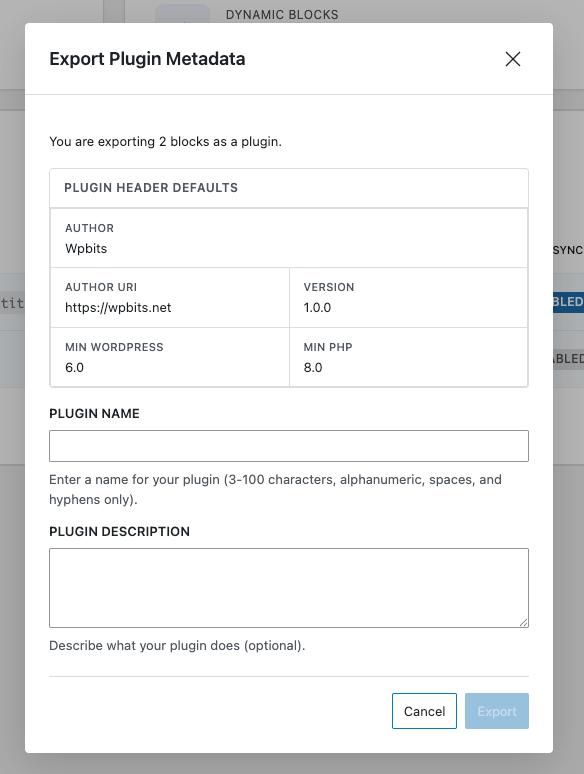
Configure the plugin details:
| Field | Description |
|---|---|
| Plugin Name | Display name for the plugin (required) |
| Plugin Description | What the plugin does (optional) |
The following are pre-filled automatically:
- Author: WPBits
- Author URI: wpbits.net
- Version: 1.0.0
- Minimum WordPress Version: 6.0
- Minimum PHP Version: 8.0
Step 3: Export
Section titled “Step 3: Export”- Click Export
- A ZIP file will be downloaded
What’s Included
Section titled “What’s Included”The exported plugin structure:
plugin-name/├── plugin-name.php # Main plugin file├── vendor/ # Composer dependencies├── block-1/│ ├── block.json│ ├── index.js│ ├── render.php│ └── template.twig└── block-2/ ├── block.json ├── index.js └── template.twigYou can rename the block folders (e.g., block-1, block-2) as needed.
Each block folder contains:
- block.json
- index.js (editor script)
- render.php
- template.twig
- editor.css, style.css
The plugin works independently of WPBits Block Studio after export.
Next Steps
Section titled “Next Steps”- Upgrading to Pro — All Pro features
- Custom Output Directory — Custom export paths