

Custom Categories
Custom Categories let you organize your blocks into logical groups in the WordPress block inserter.
Creating Custom Categories
Section titled “Creating Custom Categories”Step 1: Open Settings
Section titled “Step 1: Open Settings”- Go to WPBits Block Studio → Settings
- Find Custom Categories field
Step 2: Add Categories
Section titled “Step 2: Add Categories”- Type your category name
- Press Enter to add
- Repeat for more categories
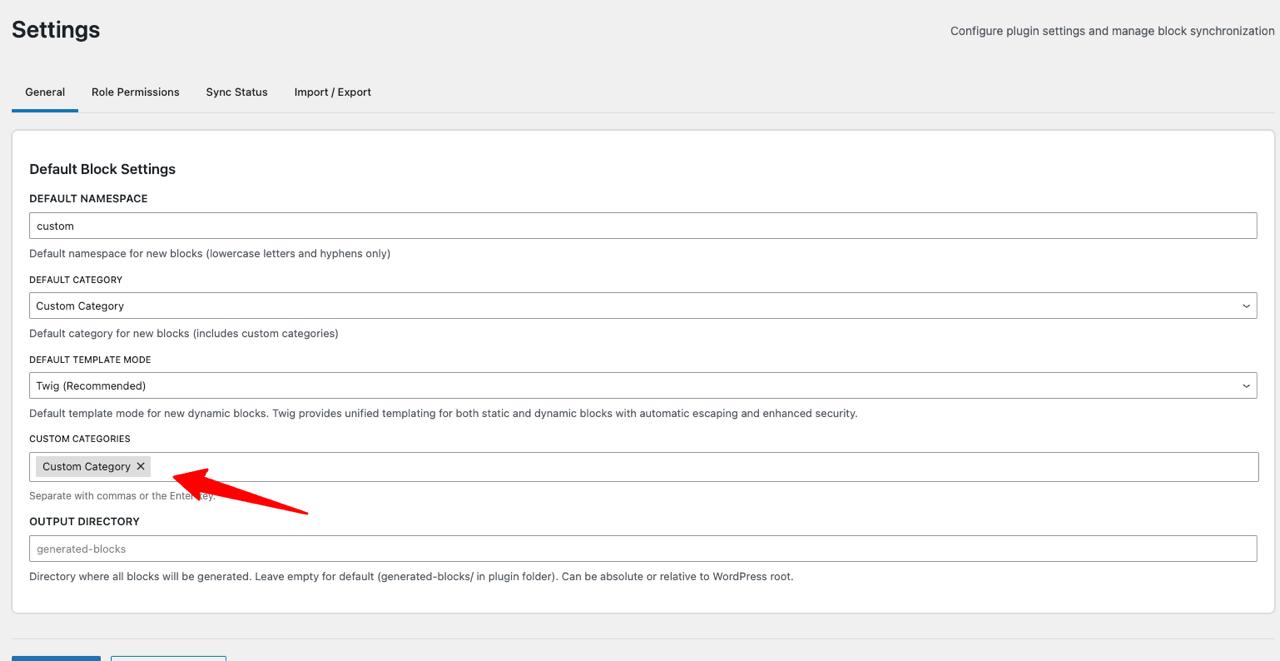
Categories are comma-separated. When you press Enter, the category is added as a tag. Slug is auto-generated from the name.
Step 3: Save
Section titled “Step 3: Save”Click Save Changes to apply.
Assigning Blocks to Categories
Section titled “Assigning Blocks to Categories”When creating or editing a block:
- Go to the block’s General tab
- Find Category dropdown
- Select your custom category
The block will appear under that category in the WordPress inserter.
Next Steps
Section titled “Next Steps”- Custom Output Directory — Set custom paths
- Custom Icon Upload — Upload custom icons