
A hero slider is often the first thing visitors see on a landing page, product page, or campaign page. It needs strong imagery, clear messaging, a CTA, and navigation that feels polished without making the block difficult for editors to manage.
This tutorial shows how to build a Hero Slider block in WPBits Block Studio. Editors will be able to add multiple slides, upload a background image for each slide, write the heading text, configure a CTA button, and control whether the slider starts automatically.
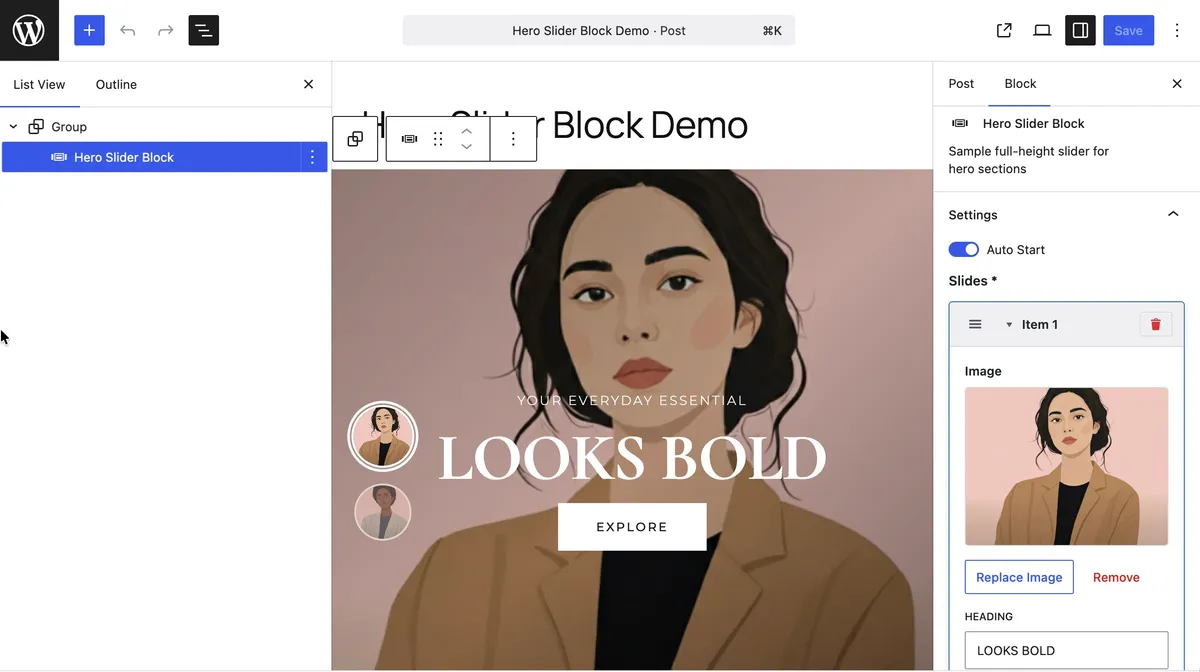
The final block includes a full-screen background slider, animated content, vertical thumbnail navigation, circular progress animation, and a small frontend script for slide transitions.

Why This Block Is Usually More Work Than It Looks
A hero slider sounds like a single component, but the conventional WordPress development route can quickly expand: custom block setup, repeatable slide data, media controls, link controls, frontend markup, responsive layout, animation timing, thumbnail navigation, and autoplay behavior.
That is a lot of wiring for a block that editors mostly need to manage as structured content. WPBits Block Studio keeps the workflow focused: define the fields, add the template, add the styles and script, then use the block in the WordPress editor.
In this tutorial, you will create:
- A reusable
Hero SliderGutenberg block - A
slidesrepeater for multiple hero slides - Image, heading, punchline, subtitle, and CTA fields
- An
autoStartsetting for autoplay control - Full-screen slide backgrounds
- Animated slide content
- Thumbnail navigation with circular progress
Requirements
Before you start, make sure you have:
- WordPress 6.0 or newer
- WPBits Block Studio installed and activated
- Access to the WordPress admin
For broader product setup and feature references, see the WPBits Block Studio documentation.
Step 1: Create a New Block
Open the WordPress admin and go to Block Builder. Create a new block for the slider.
Use these settings:
| Setting | Value |
|---|---|
| Block Name | hero-slider |
| Block Title | Hero Slider |
| Description | Display a full-screen hero slider with thumbnails and CTA buttons. |
| Category | design or widgets |
The block name should stay short and specific because it becomes part of the block identity and CSS wrapper class.
Step 2: Add the Autoplay Setting
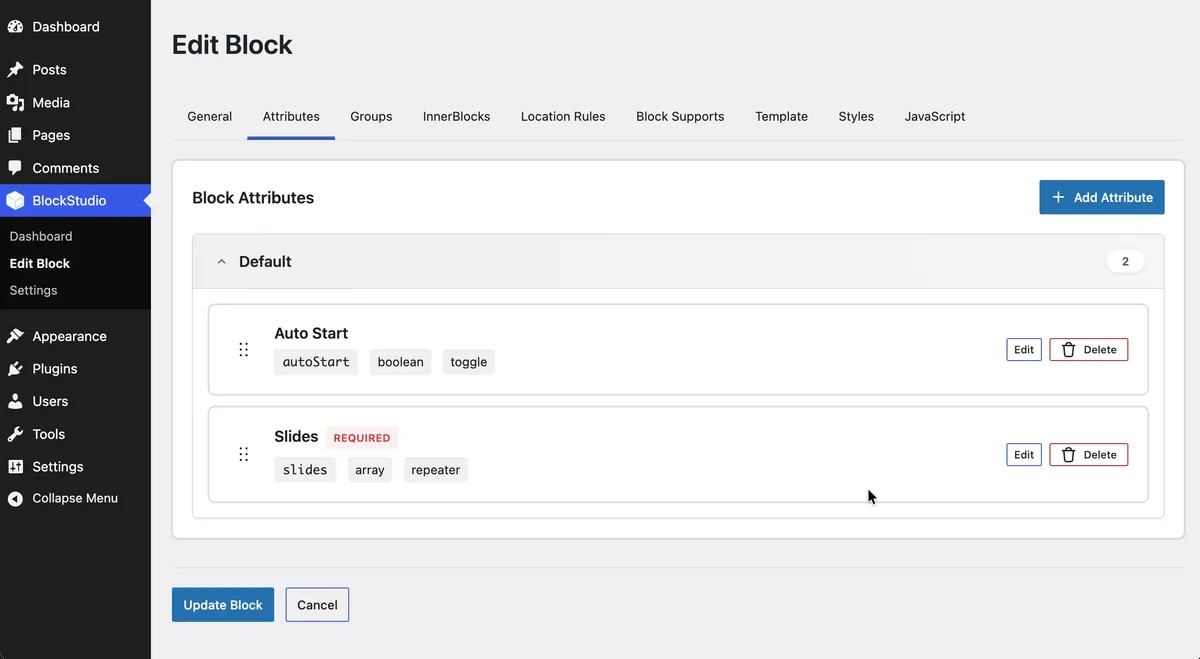
Add a top-level attribute for autoplay.
| Setting | Value |
|---|---|
| Attribute Name | autoStart |
| Control Type | toggle |
| Label | Auto Start |
| Default Value | true |
The template prints this value as data-auto-start, and the frontend script reads that attribute to decide whether the slider should start cycling automatically.
Step 3: Add the Slides Repeater
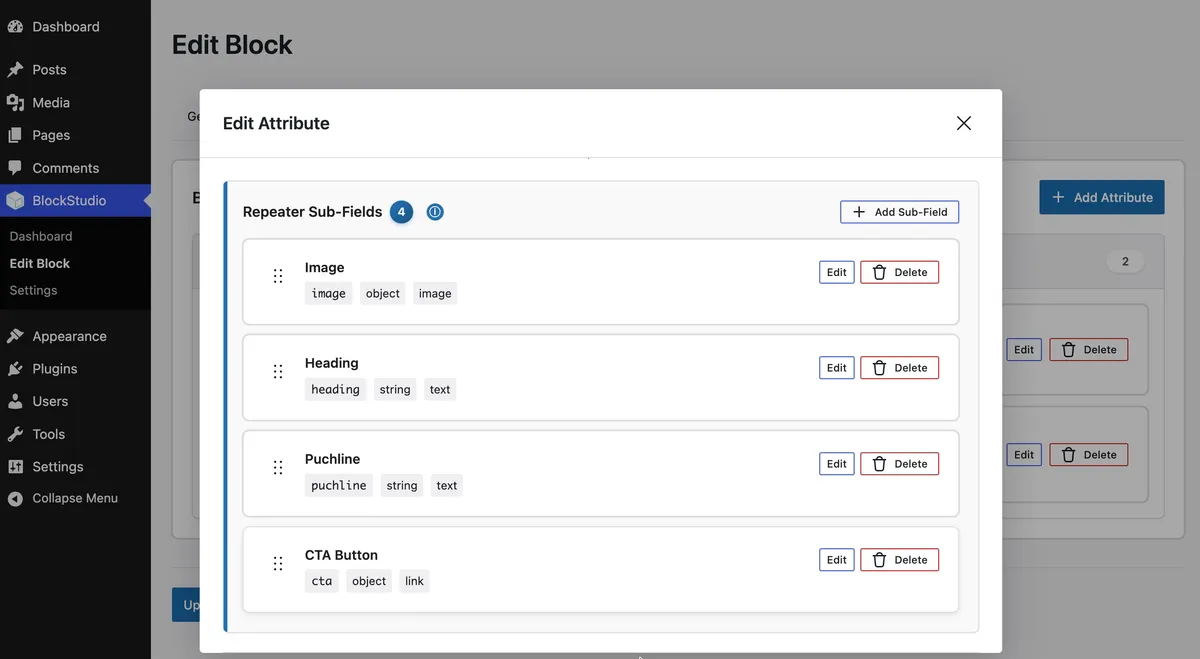
Add a repeater attribute for the slides.
| Setting | Value |
|---|---|
| Attribute Name | slides |
| Control Type | repeater |
| Label | Slides |
Inside the slides repeater, add these fields.
| Field | Attribute Name | Control Type | Label | Notes |
|---|---|---|---|---|
| Image | image | image | Image | Used for the background and thumbnail |
| Heading | heading | text | Heading | Main hero title |
| Punchline | puchline | text | Puchline | Small uppercase text above the heading |
| Subtitle | subtitle | text | Subtitle | Optional second large heading line |
| CTA Button | cta | link | CTA Button | Button URL, label, and new-tab setting |
Use the attribute names exactly as shown if you use the template below. The template reads these names directly from each slide item.
Step 4: Add the Template
Open the Template tab and add the template below.
<div {{ wrapper_attributes|raw }} data-hero-slider data-auto-start={{autoStart}}>  {% if slides is iterable and slides|length > 0 %}
    {# Background Images Container #}    <div class="wpbits-hero-slider__backgrounds">      {% for item in slides %}        <div class="wpbits-hero-slider__slide-background {% if loop.first %}wpbits-hero-slider__slide-background--active{% endif %}" data-slide-index="{{ loop.index0 }}">          {% if item.image %}            <img src="{{ item.image|esc_url }}" alt="" class="wpbits-hero-slider__background-image" />          {% endif %}          <div class="wpbits-hero-slider__background-overlay"></div>        </div>      {% endfor %}    </div>
    {# Content Wrapper #}    <div class="wpbits-hero-slider__content-wrapper">      <div class="wpbits-hero-slider__content">        {% for item in slides %}          <div class="wpbits-hero-slider__slide-content {% if loop.first %}wpbits-hero-slider__slide-content--active{% endif %}" data-slide-index="{{ loop.index0 }}">            {% if item.puchline %}              <div class="wpbits-hero-slider__description">{{ item.puchline|esc_html }}</div>            {% endif %}
            {% if item.heading %}              <h2 class="wpbits-hero-slider__title">{{ item.heading|esc_html }}</h2>            {% endif %}
            {% if item.subtitle %}              <h2 class="wpbits-hero-slider__subtitle">{{ item.subtitle|esc_html }}</h2>            {% endif %}
            {% if item.cta and item.cta.url %}              <a href="{{ item.cta.url|esc_url }}"                 class="wpbits-hero-slider__cta-button"                 {% if item.cta.opensInNewTab %}target="_blank" rel="noopener noreferrer"{% endif %}>                {{ (item.cta.title or 'EXPLORE') }}              </a>            {% endif %}          </div>        {% endfor %}      </div>    </div>
    {# Thumbnail Navigation - CSS-only circular progress #}    <nav class="wpbits-hero-slider__thumbnail-nav">      {% for item in slides %}        <div class="wpbits-hero-slider__thumbnail-wrapper {% if loop.first %}wpbits-hero-slider__thumbnail-wrapper--active{% endif %}"           data-slide-index="{{ loop.index0 }}"           data-thumbnail>          {# CSS-only circular progress (no SVG needed) #}          <div class="wpbits-hero-slider__circular-progress"></div>          {% if item.image %}            <img src="{{ item.image|esc_url }}" alt="Slide {{ loop.index }}" class="wpbits-hero-slider__thumbnail" />          {% endif %}        </div>      {% endfor %}    </nav>
  {% endif %}</div>
The template turns the block attributes into three frontend layers.
slidesis the repeater value. Eachitemis one slide.- The first loop renders the background images and overlay.
- The second loop renders the visible text and CTA content for each slide.
- The third loop renders thumbnail navigation.
loop.firstmarks the first background, content panel, and thumbnail as active on initial page load.loop.index0gives the JavaScript a zero-based slide index to match backgrounds, content, and thumbnails.item.image,item.heading,item.puchline,item.subtitle, anditem.ctaread the fields added inside the repeater.wrapper_attributeskeeps the block connected to the WordPress block wrapper and its generated classes.
Step 5: Add the Frontend JavaScript
Open the JavaScript tab and add the frontend script.
/** * Hero Slider - Vanilla JavaScript * Handles slide transitions, thumbnail navigation, and CSS-based progress animations */
(function () {  'use strict';
  // Configuration  const SLIDE_DURATION = 5000; // 5 seconds per slide
  class HeroSlider {    constructor(element) {      this.slider = element;      this.slides = Array.from(        this.slider.querySelectorAll('.wpbits-hero-slider__slide-background'),      );      this.slideContents = Array.from(        this.slider.querySelectorAll('.wpbits-hero-slider__slide-content'),      );      this.thumbnails = Array.from(        this.slider.querySelectorAll('[data-thumbnail]'),      );
      // Check if auto-start is enabled (defaults to true for backward compatibility)      this.autoStart = this.slider.getAttribute('data-auto-start') !== 'false';
      this.currentIndex = 0;      this.isPaused = false;      this.timeoutId = null;
      this.init();    }
    init() {      // Set up thumbnail click handlers      this.thumbnails.forEach((thumbnail, index) => {        thumbnail.addEventListener('click', () => this.goToSlide(index));        thumbnail.addEventListener('mouseenter', () => this.pause());        thumbnail.addEventListener('mouseleave', () => this.resume());      });
      // Initialize first slide      this.updateSlide(0);
      // Start auto-advance only if enabled      if (this.autoStart) {        this.startTimer();      }    }
    startTimer() {      // Schedule next slide      this.timeoutId = setTimeout(() => {        this.nextSlide();      }, SLIDE_DURATION);    }
    stopTimer() {      if (this.timeoutId) {        clearTimeout(this.timeoutId);        this.timeoutId = null;      }    }
    pause() {      if (this.isPaused || !this.autoStart) return;
      this.isPaused = true;      this.stopTimer();
      // Pause CSS animation      const activeThumbnail = this.thumbnails[this.currentIndex];      const progressCircle = activeThumbnail.querySelector(        '.wpbits-hero-slider__circular-progress',      );      if (progressCircle) {        progressCircle.style.animationPlayState = 'paused';      }    }
    resume() {      if (!this.isPaused || !this.autoStart) return;
      this.isPaused = false;      this.startTimer();
      // Resume CSS animation      const activeThumbnail = this.thumbnails[this.currentIndex];      const progressCircle = activeThumbnail.querySelector(        '.wpbits-hero-slider__circular-progress',      );      if (progressCircle) {        progressCircle.style.animationPlayState = 'running';      }    }
    nextSlide() {      const nextIndex = (this.currentIndex + 1) % this.slides.length;      this.goToSlide(nextIndex);    }
    goToSlide(index) {      if (index === this.currentIndex) return;
      // Stop current timer      this.stopTimer();
      // Update active states      this.updateSlide(index);
      // Reset timer for new slide (only if auto-start is enabled)      if (!this.isPaused && this.autoStart) {        this.startTimer();      }    }
    updateSlide(index) {      // Update backgrounds      this.slides.forEach((slide, i) => {        slide.classList.toggle(          'wpbits-hero-slider__slide-background--active',          i === index,        );      });
      // Update content with animation reset      this.slideContents.forEach((content, i) => {        if (i === index) {          // Force reflow to restart animations          content.classList.remove('wpbits-hero-slider__slide-content--active');          void content.offsetWidth; // Trigger reflow          content.classList.add('wpbits-hero-slider__slide-content--active');        } else {          content.classList.remove('wpbits-hero-slider__slide-content--active');        }      });
      // Update thumbnails - CSS handles the circular progress animation      this.thumbnails.forEach((thumbnail, i) => {        const isActive = i === index;        thumbnail.classList.toggle(          'wpbits-hero-slider__thumbnail-wrapper--active',          isActive,        );
        // Reset animation on all thumbnails        const progressCircle = thumbnail.querySelector(          '.wpbits-hero-slider__circular-progress',        );        if (progressCircle) {          if (isActive) {            // Remove and re-add the element to restart CSS animation            const parent = progressCircle.parentNode;            const clone = progressCircle.cloneNode(true);            parent.replaceChild(clone, progressCircle);          }        }      });
      this.currentIndex = index;    }
    destroy() {      this.stopTimer();
      // Remove event listeners      this.thumbnails.forEach((thumbnail) => {        thumbnail.replaceWith(thumbnail.cloneNode(true));      });    }  }
  // Initialize all hero sliders on the page  function initHeroSliders() {    const sliders = document.querySelectorAll('[data-hero-slider]');    const instances = [];
    sliders.forEach((slider) => {      instances.push(new HeroSlider(slider));    });
    return instances;  }
  // Auto-initialize when DOM is ready  if (document.readyState === 'loading') {    document.addEventListener('DOMContentLoaded', initHeroSliders);  } else {    initHeroSliders();  }
  // Expose for manual initialization if needed  window.HeroSlider = HeroSlider;  window.initHeroSliders = initHeroSliders;})();
The script controls the slider state and leaves the visual animation work to CSS.
- It finds every block instance with
data-hero-slider. - It collects slide backgrounds, slide content panels, and thumbnails.
- It reads
data-auto-startto decide whether autoplay should run. - Clicking a thumbnail calls
goToSlide(index)and activates the matching background, content panel, and thumbnail. nextSlide()advances through the slides and wraps back to the first slide.- Hovering a thumbnail pauses autoplay and the circular progress animation.
updateSlide(index)is the central state change: it toggles active classes and restarts the content/progress animations.
Step 6: Add the Frontend CSS
Open the CSS tab and add the slider styles.
/* Import Fonts */@import url('https://fonts.googleapis.com/css2?family=Cormorant+Garamond:wght@300;400;600;700&family=Montserrat:wght@300;400;500;600&display=swap');
/* CSS @property for smooth conic-gradient animation */@property --progress {  syntax: '<number>';  inherits: false;  initial-value: 0;}
/* Reset and Base */* {  box-sizing: border-box;}
/* Hero Slider Base Styles */.wp-block-sample-blocks-hero-slider {  position: relative;  width: 100%;  height: 100vh;  overflow: hidden;  background: #1a1a1a;}
/* Background Images */.wp-block-sample-blocks-hero-slider .wpbits-hero-slider__backgrounds {  position: absolute;  top: 0;  left: 0;  width: 100%;  height: 100%;  z-index: 1;}
.wp-block-sample-blocks-hero-slider .wpbits-hero-slider__slide-background {  position: absolute;  top: 0;  left: 0;  width: 100%;  height: 100%;  opacity: 0;  transition: opacity 1s cubic-bezier(0.4, 0, 0.2, 1);}
.wp-block-sample-blocks-hero-slider  .wpbits-hero-slider__slide-background--active {  opacity: 1;}
.wp-block-sample-blocks-hero-slider .wpbits-hero-slider__background-image {  position: absolute;  top: 0;  left: 0;  width: 100%;  height: 100%;  object-fit: cover;  transform: scale(1.1);  transition: transform 7s cubic-bezier(0.4, 0, 0.2, 1);}
.wp-block-sample-blocks-hero-slider  .wpbits-hero-slider__slide-background--active  .wpbits-hero-slider__background-image {  transform: scale(1);}
.wp-block-sample-blocks-hero-slider .wpbits-hero-slider__background-overlay {  position: absolute;  top: 0;  left: 0;  width: 100%;  height: 100%;  background: linear-gradient(    135deg,    rgba(0, 0, 0, 0.4) 0%,    rgba(0, 0, 0, 0.2) 50%,    rgba(0, 0, 0, 0.5) 100%  );  mix-blend-mode: multiply;}
/* Content Wrapper - CRITICAL FOR VERTICAL CENTERING */.wp-block-sample-blocks-hero-slider .wpbits-hero-slider__content-wrapper {  position: absolute;  top: 0;  left: 0;  width: 100%;  height: 100%;  display: flex;  align-items: center;  justify-content: center;  z-index: 10;  padding: 0;}
.wp-block-sample-blocks-hero-slider .wpbits-hero-slider__content {  position: relative;  width: 100%;  max-width: 1200px;  margin: 0 auto;  padding: 0 100px 0 140px;  text-align: center;}
/* Slide Content Container */.wp-block-sample-blocks-hero-slider .wpbits-hero-slider__slide-content {  position: absolute;  top: 50%;  left: 50%;  transform: translate(-50%, -50%);  width: 100%;  max-width: 900px;  padding: 0 2rem;  opacity: 0;  pointer-events: none;  transition: opacity 0.6s cubic-bezier(0.4, 0, 0.2, 1);  color: white;  text-align: center;}
.wp-block-sample-blocks-hero-slider .wpbits-hero-slider__slide-content--active {  opacity: 1;  pointer-events: auto;}
/* Hero Text Styles */.wp-block-sample-blocks-hero-slider .wpbits-hero-slider__description {  font-family: 'Montserrat', sans-serif;  font-size: 1rem;  font-weight: 300;  letter-spacing: 3px;  margin: 0 0 1.5rem 0;  text-transform: uppercase;  animation: wpbitsHeroSliderFadeInUp 0.8s cubic-bezier(0.4, 0, 0.2, 1) 0.3s    both;}
.wp-block-sample-blocks-hero-slider .wpbits-hero-slider__title {  font-family: 'Cormorant Garamond', serif;  font-size: clamp(4rem, 15vw, 10rem);  font-weight: 900;  color: #fff;  line-height: 0.9;  margin: 0;  letter-spacing: -0.02em;  animation: wpbitsHeroSliderFadeInUp 1s cubic-bezier(0.4, 0, 0.2, 1) 0.5s both;}
.wp-block-sample-blocks-hero-slider .wpbits-hero-slider__subtitle {  font-family: 'Cormorant Garamond', serif;  font-size: clamp(4rem, 15vw, 10rem);  font-weight: 700;  line-height: 0.9;  margin: 0 0 2.5rem 0;  letter-spacing: -0.02em;  background: linear-gradient(135deg, #ffffff 0%, #e0e0e0 100%);  -webkit-background-clip: text;  -webkit-text-fill-color: transparent;  background-clip: text;  animation: wpbitsHeroSliderFadeInUp 1s cubic-bezier(0.4, 0, 0.2, 1) 0.7s both;}
/* CTA Button */.wp-block-sample-blocks-hero-slider .wpbits-hero-slider__cta-button {  display: inline-block;  padding: 1.2rem 3.5rem;  font-family: 'Montserrat', sans-serif;  font-size: 0.9rem;  font-weight: 500;  letter-spacing: 3px;  text-transform: uppercase;  color: #1a1a1a;  background: white;  border: none;  text-decoration: none;  cursor: pointer;  transition: all 0.4s cubic-bezier(0.4, 0, 0.2, 1);  position: relative;  overflow: hidden;  animation: wpbitsHeroSliderFadeInUp 0.8s cubic-bezier(0.4, 0, 0.2, 1) 0.9s    both;  margin-top: 1rem;}
.wp-block-sample-blocks-hero-slider .wpbits-hero-slider__cta-button::before {  content: '';  position: absolute;  top: 0;  left: -100%;  width: 100%;  height: 100%;  background: linear-gradient(    90deg,    transparent,    rgba(255, 255, 255, 0.3),    transparent  );  transition: left 0.6s;}
.wp-block-sample-blocks-hero-slider .wpbits-hero-slider__cta-button:hover {  transform: translateY(-2px);  box-shadow: 0 10px 30px rgba(0, 0, 0, 0.3);}
.wp-block-sample-blocks-hero-slider  .wpbits-hero-slider__cta-button:hover::before {  left: 100%;}
/* Thumbnail Navigation */.wp-block-sample-blocks-hero-slider .wpbits-hero-slider__thumbnail-nav {  position: absolute;  left: 3rem;  top: 50%;  transform: translateY(-50%);  display: flex;  flex-direction: column;  gap: 2rem;  z-index: 20;}
.wp-block-sample-blocks-hero-slider .wpbits-hero-slider__thumbnail-wrapper {  position: relative;  cursor: pointer;  transition: transform 0.3s cubic-bezier(0.4, 0, 0.2, 1);}
.wp-block-sample-blocks-hero-slider  .wpbits-hero-slider__thumbnail-wrapper:hover {  transform: scale(1.05);}
.wp-block-sample-blocks-hero-slider  .wpbits-hero-slider__thumbnail-wrapper--active {  transform: scale(1.1);}
/* Circular Progress - SMOOTH CONIC GRADIENT with @property */.wp-block-sample-blocks-hero-slider .wpbits-hero-slider__circular-progress {  --progress: 0;  position: absolute;  top: -4px;  left: -4px;  width: 88px;  height: 88px;  border-radius: 50%;  background: conic-gradient(    from -90deg,    white 0deg,    white calc(var(--progress) * 1deg),    rgba(255, 255, 255, 0.2) calc(var(--progress) * 1deg),    rgba(255, 255, 255, 0.2) 360deg  );  -webkit-mask: radial-gradient(    farthest-side,    transparent calc(100% - 3px),    white calc(100% - 2px)  );  mask: radial-gradient(    farthest-side,    transparent calc(100% - 3px),    white calc(100% - 2px)  );  opacity: 0;  pointer-events: none;}
/* Animate the progress on active thumbnail */.wp-block-sample-blocks-hero-slider  .wpbits-hero-slider__thumbnail-wrapper--active  .wpbits-hero-slider__circular-progress {  opacity: 1;  animation: wpbitsCircularProgress 5s linear forwards;}
/* Smooth conic-gradient animation using @property */@keyframes wpbitsCircularProgress {  from {    --progress: 0;  }  to {    --progress: 360;  }}
/* Hide old SVG if it exists */.wp-block-sample-blocks-hero-slider .wpbits-hero-slider__circular-progress svg,.wp-block-sample-blocks-hero-slider .wpbits-hero-slider__progress-bg,.wp-block-sample-blocks-hero-slider .wpbits-hero-slider__progress-fill {  display: none;}
/* Thumbnail Image */.wp-block-sample-blocks-hero-slider .wpbits-hero-slider__thumbnail {  width: 80px;  height: 80px;  border-radius: 50%;  object-fit: cover;  border: 3px solid white;  display: block;  opacity: 0.6;  transition: all 0.3s ease;  position: relative;  z-index: 1;}
.wp-block-sample-blocks-hero-slider  .wpbits-hero-slider__thumbnail-wrapper--active  .wpbits-hero-slider__thumbnail {  opacity: 1;}
/* Animations */@keyframes wpbitsHeroSliderFadeInUp {  from {    opacity: 0;    transform: translateY(30px);  }  to {    opacity: 1;    transform: translateY(0);  }}
.wp-block-sample-blocks-hero-slider  .wpbits-hero-slider__slide-content:not(    .wpbits-hero-slider__slide-content--active  )  .wpbits-hero-slider__description,.wp-block-sample-blocks-hero-slider  .wpbits-hero-slider__slide-content:not(    .wpbits-hero-slider__slide-content--active  )  .wpbits-hero-slider__title,.wp-block-sample-blocks-hero-slider  .wpbits-hero-slider__slide-content:not(    .wpbits-hero-slider__slide-content--active  )  .wpbits-hero-slider__subtitle,.wp-block-sample-blocks-hero-slider  .wpbits-hero-slider__slide-content:not(    .wpbits-hero-slider__slide-content--active  )  .wpbits-hero-slider__cta-button {  animation: none;  opacity: 0;  transform: translateY(30px);}
.wp-block-sample-blocks-hero-slider  .wpbits-hero-slider__slide-content--active  .wpbits-hero-slider__description,.wp-block-sample-blocks-hero-slider  .wpbits-hero-slider__slide-content--active  .wpbits-hero-slider__title,.wp-block-sample-blocks-hero-slider  .wpbits-hero-slider__slide-content--active  .wpbits-hero-slider__subtitle,.wp-block-sample-blocks-hero-slider  .wpbits-hero-slider__slide-content--active  .wpbits-hero-slider__cta-button {  animation-play-state: running;}
/* Responsive Design */
/* Large Desktop */@media (min-width: 1440px) {  .wp-block-sample-blocks-hero-slider .wpbits-hero-slider__content {    max-width: 1400px;    padding: 0 120px 0 160px;  }}
/* Desktop */@media (max-width: 1366px) {  .wp-block-sample-blocks-hero-slider .wpbits-hero-slider__content {    padding: 0 80px 0 120px;  }}
/* Tablet Landscape */@media (max-width: 1024px) {  .wp-block-sample-blocks-hero-slider .wpbits-hero-slider__thumbnail-nav {    left: 2rem;    gap: 1.5rem;  }
  .wp-block-sample-blocks-hero-slider .wpbits-hero-slider__content {    padding: 0 60px 0 100px;  }
  .wp-block-sample-blocks-hero-slider .wpbits-hero-slider__title,  .wp-block-sample-blocks-hero-slider .wpbits-hero-slider__subtitle {    font-size: clamp(3rem, 12vw, 8rem);  }
  .wp-block-sample-blocks-hero-slider .wpbits-hero-slider__description {    font-size: 0.9rem;    letter-spacing: 2.5px;  }}
/* Tablet Portrait */@media (max-width: 768px) {  .wp-block-sample-blocks-hero-slider .wpbits-hero-slider__thumbnail-nav {    left: 1.5rem;    gap: 1.2rem;  }
  .wp-block-sample-blocks-hero-slider .wpbits-hero-slider__thumbnail {    width: 60px;    height: 60px;    border-width: 2px;  }
  .wp-block-sample-blocks-hero-slider .wpbits-hero-slider__circular-progress {    width: 68px;    height: 68px;    top: -4px;    left: -4px;  }
  .wp-block-sample-blocks-hero-slider .wpbits-hero-slider__content {    padding: 0 2rem 0 90px;  }
  .wp-block-sample-blocks-hero-slider .wpbits-hero-slider__slide-content {    padding: 0 1rem;  }
  .wp-block-sample-blocks-hero-slider .wpbits-hero-slider__title,  .wp-block-sample-blocks-hero-slider .wpbits-hero-slider__subtitle {    font-size: clamp(2.5rem, 11vw, 6rem);  }
  .wp-block-sample-blocks-hero-slider .wpbits-hero-slider__description {    font-size: 0.85rem;    letter-spacing: 2px;    margin-bottom: 1.2rem;  }
  .wp-block-sample-blocks-hero-slider .wpbits-hero-slider__subtitle {    margin-bottom: 2rem;  }
  .wp-block-sample-blocks-hero-slider .wpbits-hero-slider__cta-button {    padding: 1rem 2.5rem;    font-size: 0.8rem;    letter-spacing: 2px;  }}
/* Mobile Large */@media (max-width: 480px) {  .wp-block-sample-blocks-hero-slider .wpbits-hero-slider__thumbnail-nav {    left: 1rem;    gap: 1rem;  }
  .wp-block-sample-blocks-hero-slider .wpbits-hero-slider__thumbnail {    width: 50px;    height: 50px;  }
  .wp-block-sample-blocks-hero-slider .wpbits-hero-slider__circular-progress {    width: 58px;    height: 58px;    top: -4px;    left: -4px;  }
  .wp-block-sample-blocks-hero-slider .wpbits-hero-slider__content {    padding: 0 1.5rem 0 70px;  }
  .wp-block-sample-blocks-hero-slider .wpbits-hero-slider__slide-content {    padding: 0 0.5rem;  }
  .wp-block-sample-blocks-hero-slider .wpbits-hero-slider__title,  .wp-block-sample-blocks-hero-slider .wpbits-hero-slider__subtitle {    font-size: clamp(2rem, 10vw, 4.5rem);  }
  .wp-block-sample-blocks-hero-slider .wpbits-hero-slider__description {    font-size: 0.75rem;    letter-spacing: 1.5px;    margin-bottom: 1rem;  }
  .wp-block-sample-blocks-hero-slider .wpbits-hero-slider__subtitle {    margin-bottom: 1.5rem;  }
  .wp-block-sample-blocks-hero-slider .wpbits-hero-slider__cta-button {    padding: 0.9rem 2rem;    font-size: 0.75rem;    letter-spacing: 1.5px;  }}
/* Mobile Small */@media (max-width: 375px) {  .wp-block-sample-blocks-hero-slider .wpbits-hero-slider__thumbnail-nav {    left: 0.75rem;    gap: 0.9rem;  }
  .wp-block-sample-blocks-hero-slider .wpbits-hero-slider__thumbnail {    width: 45px;    height: 45px;  }
  .wp-block-sample-blocks-hero-slider .wpbits-hero-slider__circular-progress {    width: 53px;    height: 53px;  }
  .wp-block-sample-blocks-hero-slider .wpbits-hero-slider__content {    padding: 0 1rem 0 60px;  }
  .wp-block-sample-blocks-hero-slider .wpbits-hero-slider__title,  .wp-block-sample-blocks-hero-slider .wpbits-hero-slider__subtitle {    font-size: clamp(1.8rem, 10vw, 4rem);  }
  .wp-block-sample-blocks-hero-slider .wpbits-hero-slider__description {    font-size: 0.7rem;  }
  .wp-block-sample-blocks-hero-slider .wpbits-hero-slider__cta-button {    padding: 0.8rem 1.8rem;  }}
/* Landscape Orientation */@media (max-height: 600px) and (orientation: landscape) {  .wp-block-sample-blocks-hero-slider .wpbits-hero-slider__title,  .wp-block-sample-blocks-hero-slider .wpbits-hero-slider__subtitle {    font-size: clamp(2rem, 10vh, 5rem);    line-height: 0.85;  }
  .wp-block-sample-blocks-hero-slider .wpbits-hero-slider__description {    font-size: 0.75rem;    margin-bottom: 0.8rem;  }
  .wp-block-sample-blocks-hero-slider .wpbits-hero-slider__subtitle {    margin-bottom: 1.2rem;  }
  .wp-block-sample-blocks-hero-slider .wpbits-hero-slider__cta-button {    padding: 0.8rem 2rem;    font-size: 0.75rem;  }
  .wp-block-sample-blocks-hero-slider .wpbits-hero-slider__thumbnail-nav {    gap: 0.8rem;  }
  .wp-block-sample-blocks-hero-slider .wpbits-hero-slider__thumbnail {    width: 45px;    height: 45px;  }
  .wp-block-sample-blocks-hero-slider .wpbits-hero-slider__circular-progress {    width: 53px;    height: 53px;  }}
/* Very Short Landscape */@media (max-height: 450px) and (orientation: landscape) {  .wp-block-sample-blocks-hero-slider .wpbits-hero-slider__title,  .wp-block-sample-blocks-hero-slider .wpbits-hero-slider__subtitle {    font-size: clamp(1.5rem, 9vh, 3.5rem);  }
  .wp-block-sample-blocks-hero-slider .wpbits-hero-slider__description {    font-size: 0.65rem;    margin-bottom: 0.6rem;  }
  .wp-block-sample-blocks-hero-slider .wpbits-hero-slider__subtitle {    margin-bottom: 1rem;  }
  .wp-block-sample-blocks-hero-slider .wpbits-hero-slider__cta-button {    padding: 0.7rem 1.8rem;    font-size: 0.7rem;  }
  .wp-block-sample-blocks-hero-slider .wpbits-hero-slider__thumbnail-nav {    gap: 0.6rem;  }
  .wp-block-sample-blocks-hero-slider .wpbits-hero-slider__thumbnail {    width: 40px;    height: 40px;  }
  .wp-block-sample-blocks-hero-slider .wpbits-hero-slider__circular-progress {    width: 48px;    height: 48px;  }}
The CSS controls the full visual system for the block.
- The block wrapper creates the full-screen hero area.
- Background classes stack slide images and fade the active slide in.
- Content classes center the punchline, heading, subtitle, and CTA above the background.
- Thumbnail classes position the vertical navigation and show the active slide.
- The circular progress styles use a conic gradient and
@property --progressso the active thumbnail can animate without SVG markup. - The media queries adjust thumbnail size, content padding, text scale, and CTA sizing across desktop, tablet, mobile, and landscape screens.
Step 7: Save and Test the Block
Save the block, then open a page in the WordPress block editor.
Insert Hero Slider and add at least three slides. For each slide, upload an image, add a punchline, heading, optional subtitle, and CTA button. Turn autoplay on and off to confirm autoStart is working.
On the frontend, check:
- The first slide is visible on page load
- Background images fade between slides
- The heading and CTA animate when the active slide changes
- Thumbnail clicks move to the correct slide
- The circular progress restarts on the active thumbnail
- Hovering thumbnails pauses autoplay
- CTA links open correctly, including new-tab behavior
- Text remains readable on mobile and landscape screens
Practical Extensions
Once the base slider works, you can extend the same pattern without changing the overall structure.
Useful additions include:
- A color control for overlay strength
- A select control for content alignment
- A range control for slide duration
- A toggle for showing or hiding thumbnails
- Separate mobile images for art-directed hero crops
The main pattern stays the same: the repeater stores each slide, the template renders the layers, the CSS handles presentation, and the script controls active slide state.
Final Result
You now have a custom WordPress hero slider block with repeatable slides, large background imagery, animated content, thumbnail navigation, circular progress, and optional autoplay.
WPBits Block Studio lets you build this as a reusable editor-friendly block instead of maintaining a full custom block setup for a common hero component.